
 Last night after work I went out to eat because it had been a very long day, I was too tired to cook, and I wanted breakfast. And it was wonderful. Perfectly cooked. Perfectly seasoned. I couldn't have made it better myself. It was so good that I was able to overlook the cost, which was expensive. But no more expensive than anything else out there now-a-days, which means it was actually a fair price.
Tonight when it was time to go home after another very long day, I was seriously wanting to go out for breakfast again, but didn't want it to get weird, and furthermore didn't have the money to be spending two nights in a row.
Instead I went home and had cereal with toast. Followed by apple sauce and crackers. Followed by freeze-dried strawberries and more crackers.
And I ate all that in the cold.
Can somebody please explain Apple's thinking when Siri's response to "Hey Siri, make it warmer" inevitably ends up being "It's 70° in here and could take a while to warm up. Are you sure you want to make it warmer?"
When I'm cold and want it warmer, what the fuck difference is telling me a number going to make? Is their thinking that I'm going to hear a number and think "Oh. I guess I'm not cold after all! Never mind, Siri!"... because what kind of stupid shit is that?
Likewise, what good does telling me that it could take a while to heat up going to do? Do they honestly believe that I'm going to hear that and say "Oh, if it's going to take a while, just forget it then!"... because that's even more stupid.
JUST MAKE IT FUCKING WARMER LIKE I ASKED! DON'T WASTE MY TIME WITH THIS NONSENSE THAT'S NOT GOING TO CHANGE MY BEING COLD!
This kind of idiotic shit drives me insane. But when it comes to Siri, about all you get is idiotic shit. Siri is 14 years old but, due to how smart everything else is getting smarter while it stays the same, Siri seems to be getting more and more stupid. We were supposed to get an update well over a year ago, but it still hasn't shown up.
What has shown up is a headache, so I guess I'll grab an aspirin and call it an early night.
Assuming my cats don't wake me up because they're cold.
 More tech drama. Have I mentioned how much I loathe Apple
 HomeKit HomeShit?
If I haven't (let's be real, I definitely have) then you should probably know that my hatred is very real, and has now reached such depths as to send me into a rage just thinking about it. As I wrote yesterday I awoke to find that on the first day in this Year of Our Lord, 2026, 3/4 of my "smart" home devices were offline and half my Automations were missing. Now, when this happens I can usually get most of those devices to come back online if I power-cycle all my hubs (nothing can be done to bring back the automations). It's for this reason that I have non-HomeShit power plugs on all my iPod minis and AppleTVs.
And so, before I left on an errand I had to run before work, I sat in my car to power off all the hubs. Then, when I finished my errand and made it to the office, I turned them all back on. Three hours later as I ate lunch, I pulled up Apple's HomeShit app on my iPhone... and... there were stil six devices which hadn't recovered. Which means I'm going to waste time removing them then resetting them so I can re-add them before re-writing the Automations that got trashed somehow.
Easy.
Just time-consuming.
And here's a new wrinkle... the re-written automations do not work!
No idea why. I can test them. They test as expected. But they don't work.
For exmaple... I have it so when one of the lights in the guest bathroom is turned on, the other light turns on too. Turn one off, they both turn off. It's incredibly basic, but important because otherwise it's not light enough in there.
Absolutely no idea what I do now. After dinner I'll delete them all and try re-writing one more time. If that doesn't work, I guess I have to try removing devices and re-adding them. If that doesn't work, then I guess I have to completely reset absolutely everything and start over from scratch.
If that ends up being the case, I can say goodbye to my weekend.
Which brings me to a decision I have to make...
I gotta tell you... Option #3 is looking very appealing to me. If I waste two days and the shit is still broken, I'm going to be angry and never get over it. If I trash HomeShit and start over with something else which ends up broken, I'm going to be angry and never get over it. If I just end up giving up completely on having a "smart" home, I'm totally going to be angry.
But I'll get over it.
I just have to go back to remembering where all the light switches are and figure out and possible have to re-think some lighting in a few places. Like the guest bathroom.
In other tech drama, I'm slowly getting all my data transfered from my QNAP NAS to my UGREEN NAS.
This is taking a while because I have a metric shit-ton of photos to copy. I always took a lot of photos when I traveled. Then when the charity closed and I wasn't traveling as much, I ended up with Jake and Jenny and started taking a metric shit-ton of cat photos. You know how it goes.
My problem is (and always has been) that I don't sort through photos after I take them. I snap! snap! snap! snap! take them with the intent of keeping the best images and tossing the rest. Except I never have time to do that. Maybe I'll commit to sorting through 50 photos every morning when I wake up and see if I can whittle down the number of photos in my archive by half. Or, if I get serious about it, whittle down to a quarter of what I'm sitting on. Which should be easy because there's just so many pictures that are practically identical. There's AI software which is supposed to make the task easier, but I've not looked into it. And maybe I should.
In the meanwhile, I guess I save my money for a new pair of hard drives, given the ones I have are all older and probably not very reliable. They will likely be giving up the ghost soon.
Like myself.
Or like my patience with HomeShit, which has now evaporated.
 Happy New Year!
Or not.
I woke up this fine New Year only to find that Apple's HomeKit HomeShit had shit the bed... yet again. Most of my devices were non-responsive and half my Automations were missing. I'd say that this is a bad omen of how my 2026 is going to go... but this happens at least twice a year (it happened four times in 2025, I kept count)... which means this is likely just a coincidence. As always, no fucking clue why this happens or how to fix it without resetting everything. And rewriting all my automations, since Apple doesn't bother to back up anything despite these failures being a regular occurrence. Holy fucking shit I wish I hadn't moved to Apple for my smart home. But my previous gear was discontinued, so I did it. And should have gone with something else. Anything else.

In an inexplicable turn of events, a shocking number of fireworks went off last night. An insane number. They started at 7:30pm and ran constantly all night... traumatizing my cats. And I don't get it. We didn't get this many fireworks for the 4th of July. Perhaps people are so sick and tired of 2025 that it seemed appropriate?
Though why they think 2026 is going to be any better is a mystery.
There was no white Christmas where I live this year.
When my mom was a kid, the snow got so deep that they used to jump off the roof of a two-story house into it. When I was a kid, the snow got so deep that we used to tunnel under it from yard to yard. But this year? Nothing. No snow, last night it was just bitter, bitter cold. It was so cold last night that I double-bagged my feet with wool socks. Something I never felt the need to do when I was in Antarctica. I also asked Siri to "make it warmer" in my house, at which point I was told "Your thermostat is already set to 71°, and it may take some time to warm up." Very helpful. Thanks so much. Not a great night to have no working electric blanket.
But maybe I'm getting a white New Year?
As I type this, it's trying to snow. A light, loose powder, but enough to cover my back porch and that's something.
Not enough to stave off drought this Summer, but... something.
I'm sitting here wondering what the heck happened to my weekend and all the things I was supposed to get done that I never did, but I'm still getting Blogography done... because an all new Bullet Sunday starts... now...
• Melissa. Hurricanes are a way of life in the Caribbean. But there are hurricanes, and there are hurricanes. And it's looking very bad indeed for Jamaica. Right now it's looking like Hurricane Melissa is going to hit at a minimum Category 4... maybe even Category 5.
At the 3:29 and 5:40 there's a cat in the frame, and chickens at 5:51, and it fills me with despair for the animals that have no idea what's coming... and no way to prepare and stay safe.
• Papal Security! When you're raised Catholic, the Pope becomes a rather large figure in your life. But when I was young, I didn't know much about him other than he was the leader of The Church whom I should keep in my prayers. Then I left... or rather I was kicked out when I was asking too many questions during Sunday School... and that was the end of it. Except my grandmother remained Catholic, and so on my first trip to Rome in 2000, I decided to visit the Vatican museum and buy her a rosary souvenir because I was told they all got blessed by the Pope. It was there that I was first introduced to The Swiss Guard, which is a fascinating topic...
The thing that makes them so iconic is their hallmark colorful uniforms, which I think have got to be one of the most beautiful uniforms there's ever been. Despite being so bright, they don't cross the line into garish. Probably because of the way they're constructed. With the exception of the cuffs, the red accents are hidden in-between the panels of gold and blue, so they are only visible when a guard bends or moves. It' a very cool effect. It's commonly thought that Michelangelo designed the uniforms, but it's not true. They were designed hundreds of years later, long after he died, by Commandant Jules Repond in 1914. It's a fun urban legend though.
• WE PWNED! If you're not scared shitless for the future of this country as it's being taken over by corporations owned by the wealthy elite, you're not paying attention...
It's all by design. All of it. Our government is owned by these incredibly wealthy people who get regulations and laws changed to benefit them instead of the American people. You can see it everywhere if you just look around. We are beyond fucked.
• Classic! You can have my old-school 1990's Speed Queen Washer & Dryer that came with the condo I bought when you pry them from my cold, dead hands. I am forever indebted to my friend who told me I was crazy to get rid of them. Since I've already had to replace an oven that only lasted 5 years, I'm betting my microwave, refrigerator, and new freezer are not long for this world. And here's why...
There's a huge, huge opportunity for a company to start releasing old-school appliances that will actually last. I would happily go back to an oven with knobs and dials if it means I don't have to replace them so quick. Though it sounds like that might not even be possible given what's presented in that video.
• Package PingPong! A couple days ago I wrote about a package which was supposed to have been delivered this past Monday. It made it to Spokane, 3 hours away, but then kept going back and forth. Last I checked, it had made it to Spokane twice but then was headed back to Ohio. Again...
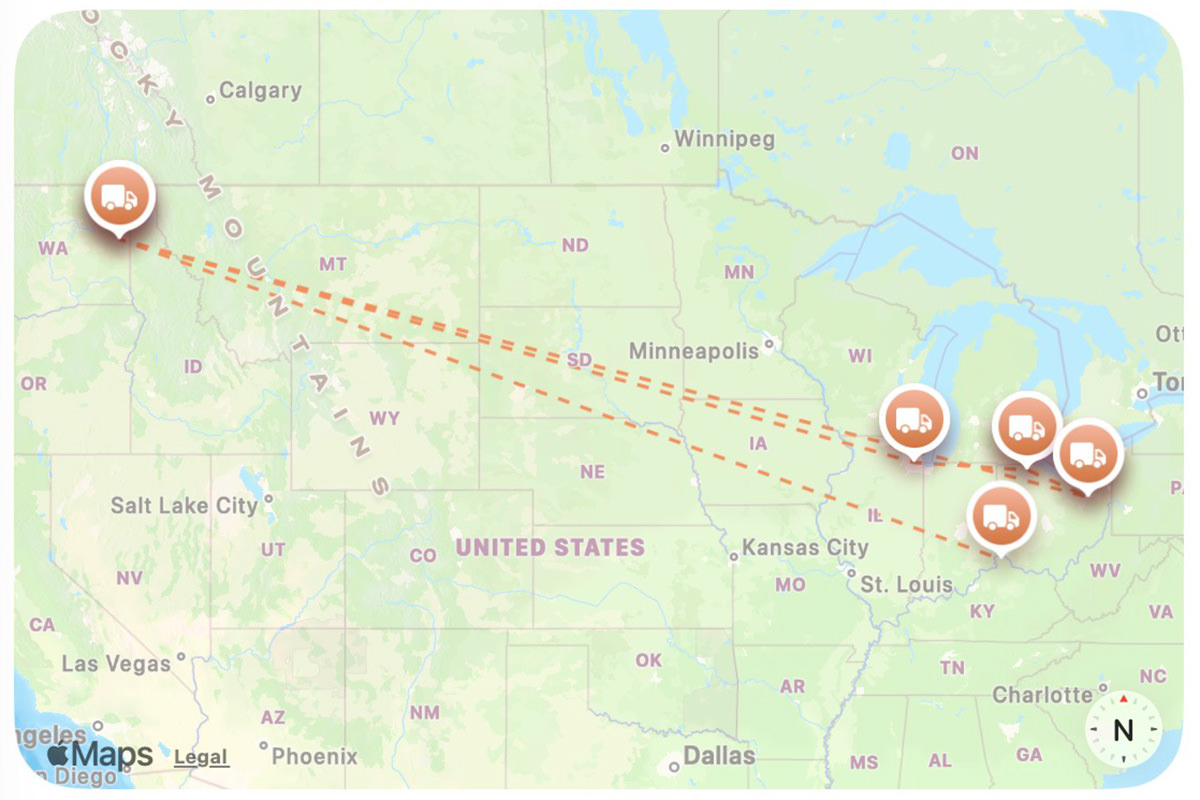
But then Friday night I checked again. Sure enough, it was back in Ohio. But when I checked this morning, all the previous back-and-forth had been erased. As if it never happened...
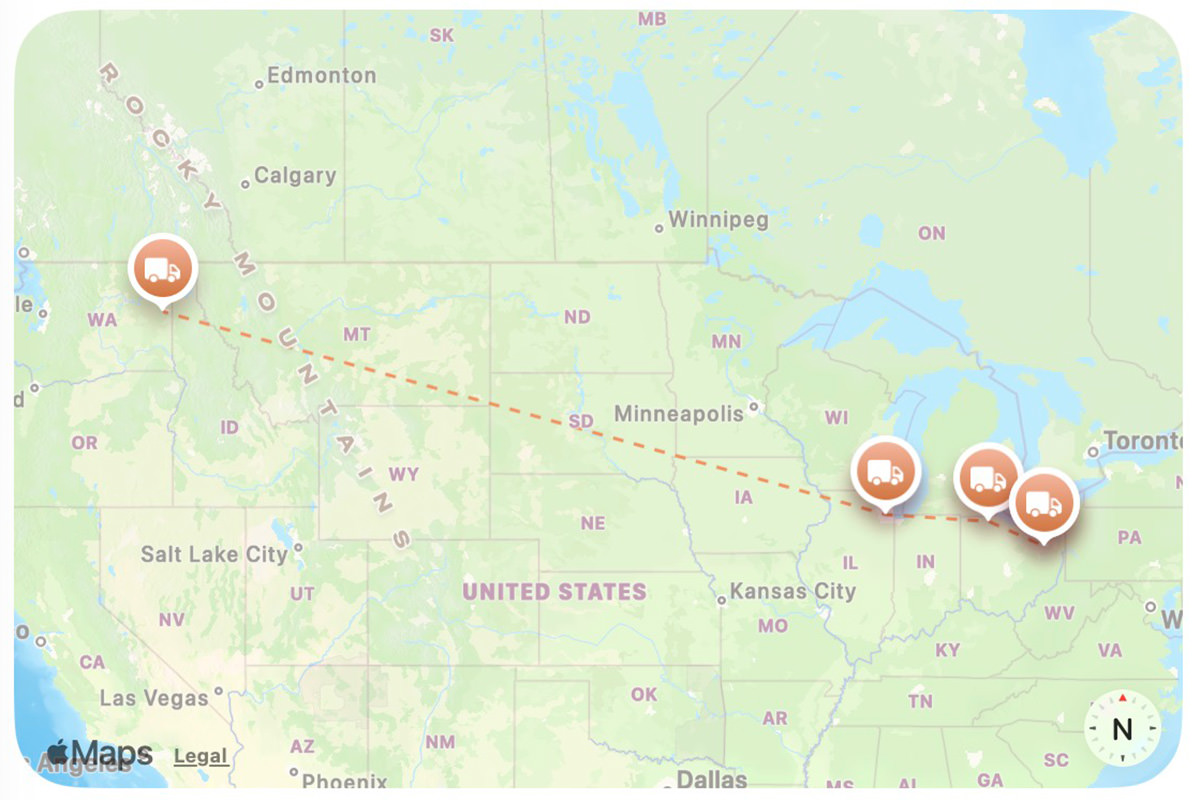
Apparently UPS has finally realized there's a problem, corrected it (I hope), and then made it look like nothing was amiss. And it gets worse... if the package is in Spokane, then it should be delivered to me on Monday. And that's what UPS says is going to happen. But they've said that previously. Before the mysterious "YOU DIDN'T SEE THAT!" correction, it was projected to arrive on Wednesday. Now it's two days earlier. I will be very interested to see what the package looks like when it (eventually) gets delivered. It's been through a lot.
• iBusted! I finally did a Google Search to try and find out why I'm having so many problems with the Apple iPhone keyboard lately. It seems as if it's constantly coming up with words that I'm not typing. And since I use the "swipe" method of typing, it's very, very noticeable. And the answer is nope! Not just me...
It's absolutely pathetic how fucking bad that Apple products are becoming. Between Apple Home, CarPlay, and Siri all being a pile of shit, the Apple "experience" is so far behind what others are doing as to be embarrassing. Forget about all the broken promises that were supposed to make Apple reign supreme by having "Apple Intelligence" make their products the best in existence... Apple can't even be assed to through money at the problems they can actually fix!
• ERROR! ERROR! I watch a lot of YouTube videos. It's pretty much the only thing I do watch any more since streaming companies have lost their damn mind with their pricing. Last night a video came up about a horrible software error in a radiation treatment machine which killed people. Twice the city where tragedy happened was Yakima, Washington... a city not too far from me. It was a fascinating watch, but grated on me because they kept mispronouncing "Yakima"...
In the video, he says "yaw-KEEmah" but it's actually "YAKihmah." Now, when it comes to Native American words, nobody is going to get it perfect if they've never heard it before (and even then it's not guaranteed). And then there's the added complexity of non-Natives changing the pronunciation so that it's more comfortable for them to say. But in any event, there's a way that locals say it and, given how this is most certainly available somewhere on the internet with an easy Google search, it's strange that the narrator for a video wouldn't take a minute to make sure their pronunciation is accurate. Or at least in the ballpark. Oh well. Just another case of my being picky, I suppose.
And now I guess I'll load my dishwasher so I can feel like I accomplished something before Monday rolls around.
Siri, the Apple digital "assistant," made me totally lose my shit today.
I needed to sweep out the garage, so I told Siri to unlock the front door instead of opening the garage door, as I'd be parking in the driveway for a while. Siri responded with "Your front door can't do that."
And I lost it. Totally and completely lost it.
I was screaming in my car... "CAN'T DO THAT? MY FRONT DOOR CAN'T UNLOCK? WHAT IN THE HELL DO YOU MEAN, YOU STUPID PIECE OF SHIT?!? YOU'VE UNLOCKED IT BEFORE, SO WHAT'S CHANGED? YOU HAVE GOT TO BE THE MOST WORTHLESS FUCKING PILE OF TECH TRASH SINCE MICROSOFT BOB! HOW THE FUCK DOES APPLE CONSIDER YOU TO BE A SMART ASSISTANT? YOU'RE THE DUMBEST ASSISTANT IN THE HISTORY OF SCIENCE! EVEN THOMAS MIDGLEY JR. WAS JUST EVIL AND NOT INCOMPETENT LIKE THIS. FUCK OFF... FUCK YOU... AND DEFINITELY FUCK APPLE!!!"
I would have kept going, but I was home already.
And here's the thing. Siri was listening to my rant the entire time. The rainbow glow was circling my CarPlay screen, so it was all recorded. Then it was assumably sent to Apple. And I hope they listen to it, because they've earned every fucking word.
There was good news to be had, however.
Ewan McGregor and Charley Boorman are back with another season of their Long Way... series on AppleTV+ where they take a big motorcycle trip together. It's always a wonderful adventure, and this time looks like no exception...
The thing that strikes me when watching the show is just how incredibly nice Ewan McGregor is to the people he meets. Never has an unkind word. Always willing to engage with fans. Never gets tired of chatting about Star Wars. All too often, big Hollywood stars end up being such assholes. It's so refreshing to see the opposite of that.
Especially on a show this good.
Which is well worth your time whether you like motorcycles or not.
 The fact that Apple HomeKit can't seem to maintain connections... and has its automations fail for no reason all the time... is only half the reason I hate it so much. A major problem with HomeKit is that the automations are so ridiculously underpowered and limited. If you want to do anything more than the most basic of tasks, you're out of luck.
Homey Pro, on the other hand, is fairly robust. Their automations are called "flows." And you have your pick of how deep you want to go. Their standard flows are very reminiscent of HomeKit. Basically an IF THIS HAPPENS, THEN DO THAT situation. But if you want more than that, you can use Homey Advanced Flows.
Despite the fact that they are indeed more advanced, they are surprisingly easy to use because of the beautiful graphic interface that Homey has come up with. In many ways, I find it easier to use than the basic option...
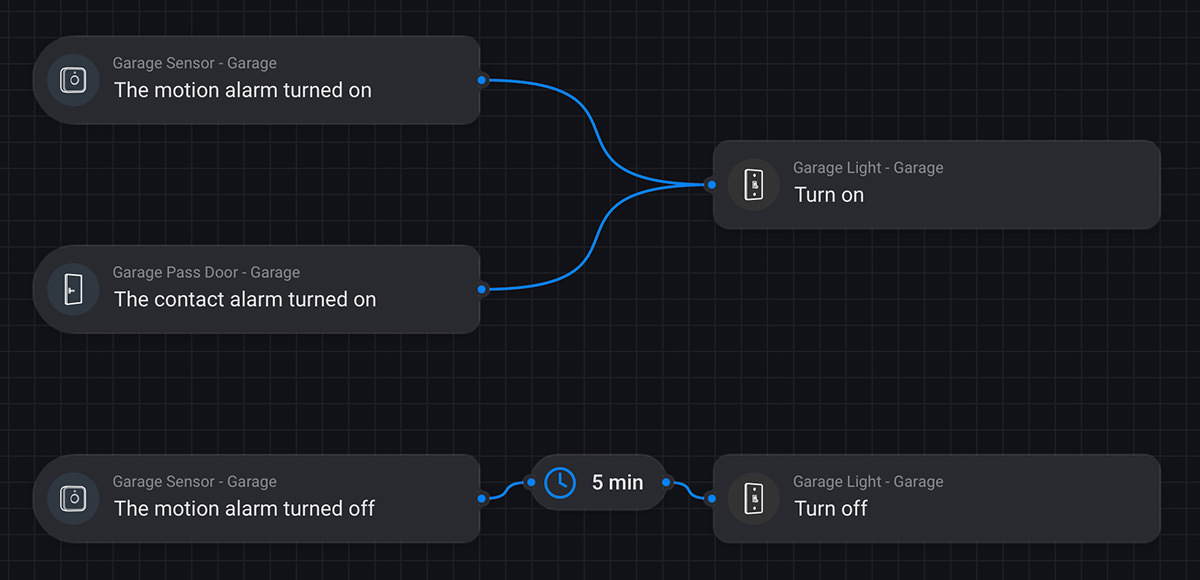
Here I am building a routine that monitors the brightness of the living room. If it drops to certain level of darkness and it's before 9pm, the lights turn on. If it's after 10pm and there's nobody home to turn the lights off, they turn off automatically...
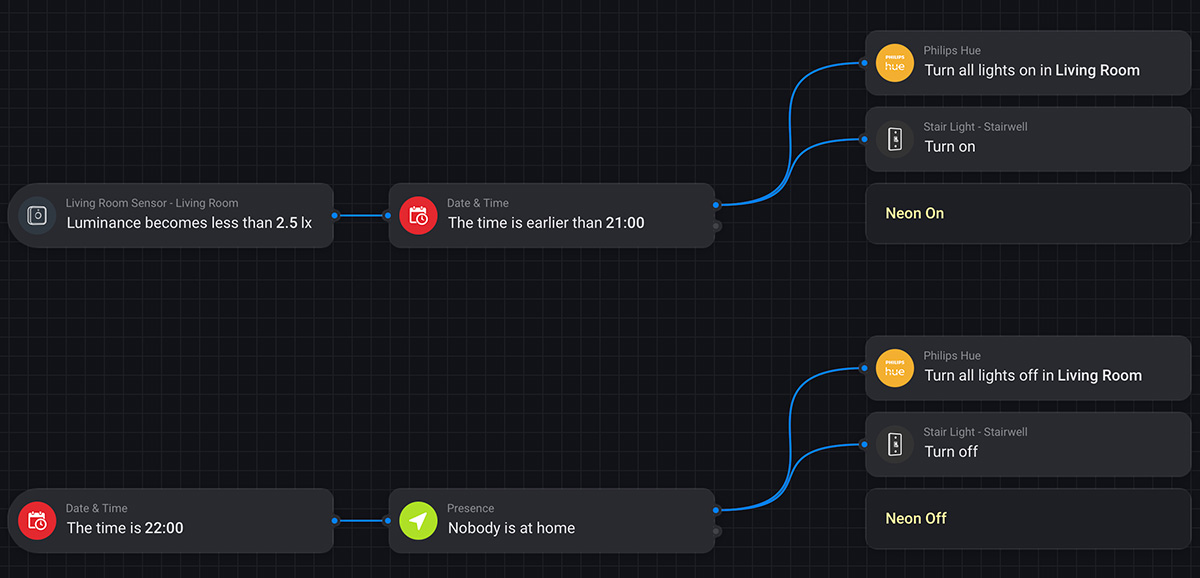
This isn't terribly complex, yet. I have the option of adding an ELSE to the conditionals. For example, if it's after 10pm and somebody actually is home, I can have an entirely different set of routines be initiated. So many possibilities, and I've not even scratched the surface.
Homey Pro may not rely on the cloud to do what it does (everything on the Pro is processed locally) but it's not entirely isolated. For example... if there's a water leak detected, not only will the Homey Pro light up and glow blue, but a text message will be sent to my iPhone and the Sonos speakers in my living room and bedroom will announce the leak...
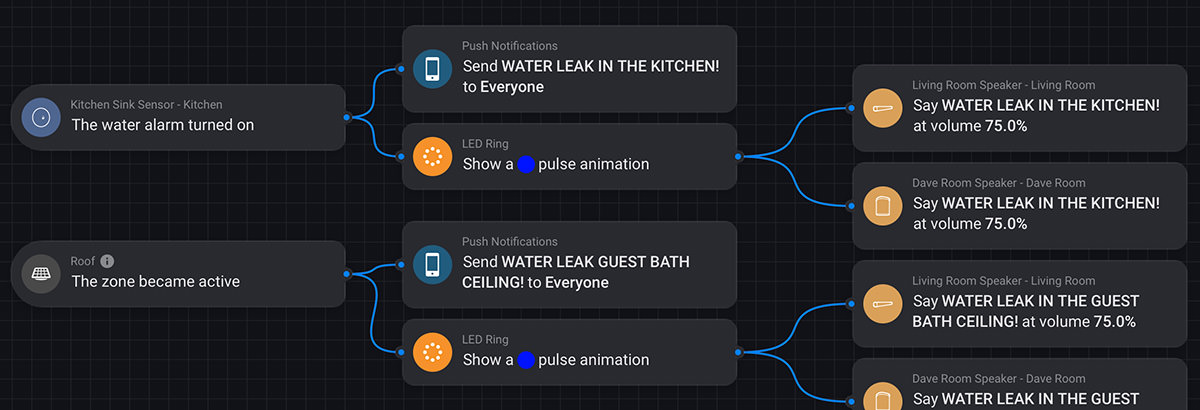
One of the many features I'm interested in exploiting is global variables. You can have routines set variables in one place, then have them available to every flow you create, at which point they can be modified. This could end up being very handy in the future when I'm doing far more complex interactions between devices.
If there's one thing about all this that I'm certain of, home automation is addicting. And the seemingly limitless options provided by Homey Pro Advanced Flows are certainly going to suck up a lot of my time. The more I play around, the more I'll learn how to do things better. So I'm sure there'll be loads of tweaking from here on out.
And here's the thing... if "Advanced Flows" are still not capable enough for you, then you can turn to Homey Script, which allows programmable goodness...
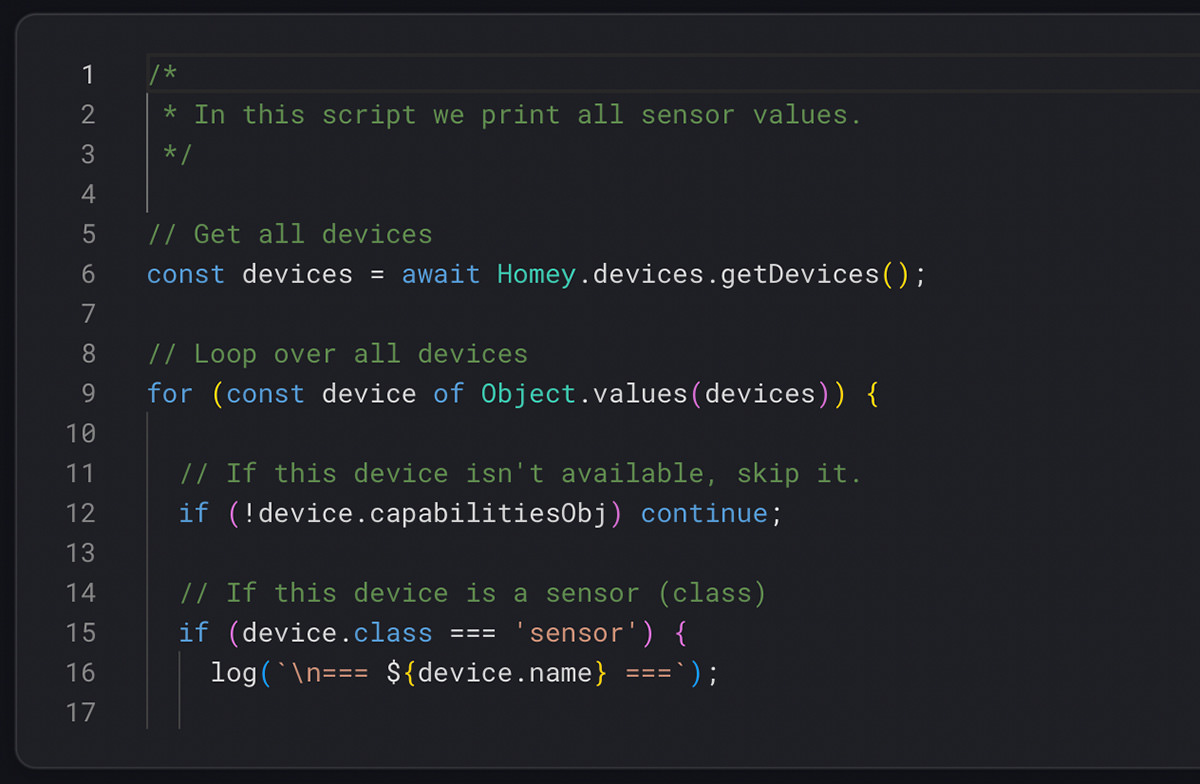
I really hope that I never get to the point that I need this.
But anyway...
Despite divorcing myself from HomeKit, I'm still firmly entrenched in the Apple Ecosystem. I still want to use Siri as the trigger for manually starting automations that I build. Fortunately, Homey Pro has Siri Shortcuts integration, so I can just delete my HomeKit Automations, rewrite them as Homey Pro Flows that are named the same, then create a Siri Shortcut to run them. That way I don't have to remember any new naming scheme for what I've already learned. Easy.
And there you have it. After a decade I am done, done, DONE with shitty fucking HomeKit.
I hope.
Yes, I left all my devices in HomeKit just in case, because you never know, but for now I am happy that I finally have a way to move past all the limitations I've been trying to work within since I started with home automation all these years.
Any parting comments?
Yes. Thank God I didn't go 100% Aqara as I planned when Homey Pro fell through the first time. The Zigbee protocol that Aqara uses is utter shit. I bought some water leak sensors because they were the most economical leak sensors I could get (at a time when I was pouring money into water leak repairs). Pairing the sensors to the Aqara M2 Hub was not a big deal. But I could never pair the M2 Hub (via Matter) to Homey Pro because it said devices weren't attached. Which they were. So I had to pair the sensors directly to Homey Pro which was a horrific ordeal. For my first two units it took a minimum of six tries. The third took ELEVEN tries. The fourth took eight. The fifth? Still hasn't paired. This is utter madness. I don't know why the Aqara M2 Hub has no problem pairing with them but the Homey Pro is so utterly hopeless. I may end up replacing all the Aqara sensors with Matter versions if I can find affordable ones next Black Friday.
 A full half of my smart devices are from Eve Home. Which meant once I got the routine figured out to get them brought into Homey, it was simple (if time consuming) to power through them all.
But the entire point of Homey (other than getting rid of HomeKit) was bringing the many other devices I have into my smart home. Some of which were never able to be used with HomeKit.
Fortunately, there are apps for that...
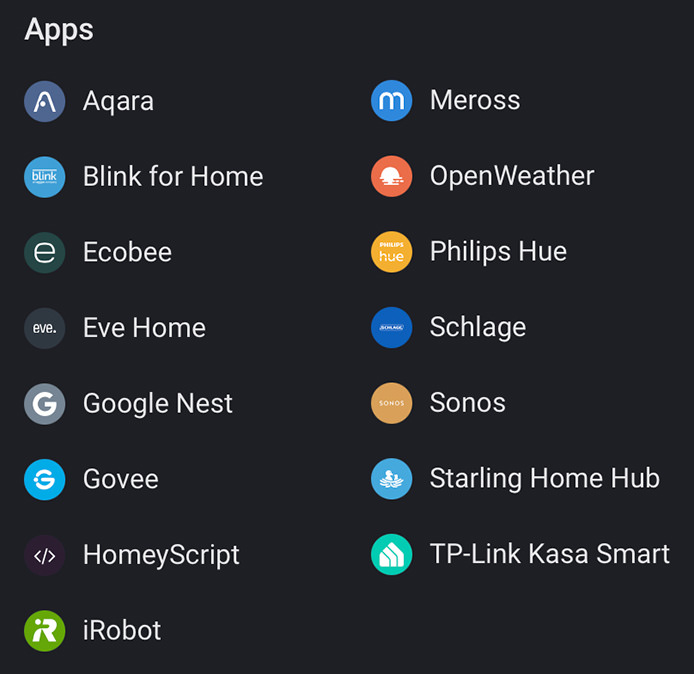
The only one I'm having issues with is Google Nest. I'd like to be able to use their motion detection, but haven't figured out how. I'll keep working on it because it's supposed to be possible.
All is not perfect though. There are some devices I own without apps available...
But anyway... all of the devices I own which can be brought into Homey are now in Homey.
Except one.
I was positive to make sure that the Nanoleaf light strip I bought for under my kitchen cabinets was Matter compatible. Except I cannot get it into anything except HomeKit for some reason. And I tried for over an hour to get it into Homey. This is incredibly frustrating. I don't know if Amazon sent me the wrong version or what, but there's no Matter pairing code anywhere to be found on the device or the documentation. I wrote to Nanoleaf to see if anything can be done but, odds are, I'm fucked and will have to buy new ones. What's really frustrating is that the Nanoleaf app seems to imply that they are Matter compatible...
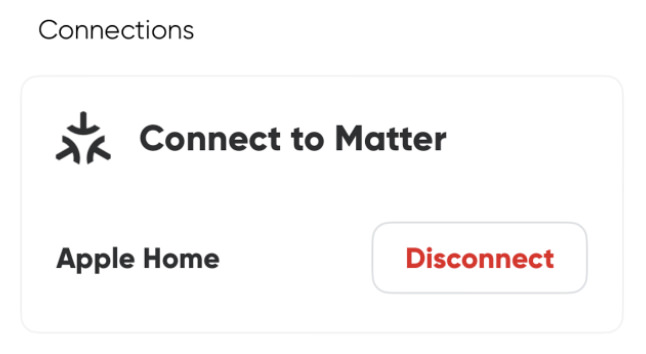
Other than that, everything has gone as well as I could have hoped.
Tomorrow I'll wrap this up with a look at the amazing automation tools that Homey Pro offers. Or "flows" as Homey calls them. It's not perfect, but they're so easy and powerful to use that they're darn close. Most everything I ever lamented not being able to do with HomeKit is a piece of cake, and for that alone I'm very happy to have made the leap.
 Tonight I finally finished upgrading all my Eve devices to Matter. Despite the time involved, it went about as smoothly as you could hope for.
But then it came time for all the other devices, and it's like I've been walking hip-deep in molassas. Devices are taking multiple, multiple tries to get connected. Though once they are connected they seem to be operating just fine. Hopefully they stay that way.
Since it's now past midnight, I think I'm throwing in the towel for the day. Maybe tomorrow night I'll make some headway on the rest.
The Homey Pro smart home hub is an expensive investment. Purchasing the unit on Black Friday saved me $50 (plus I saved $4 on the ethernet adapter I bundled with it), but I still had to pay a whopping $372.36 for the thing. In my humble opinion, this is radically overpriced, even considering its wonderful capabilities, and I would have been much more comfortable if it were in the $250 range. At the very least, ethernet could have been included. And yet... I get it. This is the cost that's what you'll pay for a Home Assistant box, but that requires a lot of your time to get working, and I've never been ambitious enough to try and wrap my head around it. So paying Homey engineers to do the heavy lifting is a fair trade-off.
The thing that I just don't know is if my investment is going to work out long-term. Athom, the company that developed Homey, was bought out by LG. This could be a good thing in that more money will (theoretically) be available to continue developing the project. But just as Samsung has hopelessly screwed up SmartThings, there's a very real possibility that LG will fuck up Homey and I'll be forced to jump to Home Assistant. Which is probably what I should have done from the start, but I just don't have the time to invest in learning how to make it work with all my stuff.
But anyway...
Homey Pro (which I'll be calling "HP" from her on out) has an IR blaster which can (assumably) be used to control my television, so I put it directly under the TV (where it also has an ethernet hub available for a more reliable signal vs. WiFi).
Once you've got HP set up via the Homey app, you can visit the HP "App Store" to get free apps for controlling all your stuff. Many are created by the HP community... but a surprising number of them are official apps direct rom the manufacturers themselves.
One of these apps is for Aqara devices. It was my plan to integrate my Aqara stuff via the Aqara hub's Matter upgrade. But when I tried, HP said that my hub didn't have any devices attached? So I used the official Aqara app and paired all the sensors directly to HP. And since you can only pair the devices to one hub at a time, that means my Aqara hub is now useless and got tossed in my electronics box. To be honest, the pairing is not easy. The first sensor took two tries (the second took six?!?). Three more to go. I really hope that's the end of it.
Next up I decided to jump head-first into what I've most been dreading... upgrading my Eve Smart Home light switches to the new Matter Smart Home protocol so that they can be controlled via Homey Pro instead of only horrendously shitty HomeKit.
I started with a single light switch that I rarely use. It went fairly well, but took some time...
If all goes well, you then have a Matter-enabled light switch which is accessible by Homey Pro, Apple HomeKit, and even other smart home ecosystems which can integrate Matter devices (like Google Assistant and Amazon Alexa). If all doesn't go well, then you'll end up having to delete the device from HomeKit, reset the Eve light switch, add it back to HomeKit, then do steps 3-5 again. Fortunately, this only happened once so far.
UPDATE 12/4/2024: Over the course of two evenings, all my Eve light switches, motion sensors, door & window sensors, and smart plugs had been updated to Matter and added. Surprisingly, out of dozens of devices, only two light switches ended up giving me problems. But that was easily solved by resetting and re-pairing.
And now the real fun begins.
The biggest benefit of Homey Pro is that it can control such a wild variety of smart devices. And I have a ton of them. Everything from my Roomba robot vacuum to my security system to my smoke detectors (to name a few). Figuring out how to get all that stuff added so I finally have a cohesive smart home that's actually smart and where everything can work together is going to be my obsession for the rest of the week, I'm sure.
To say that I outright loathe HomeShit HomeKit is a massive understatement. Apple has fucked up their "smart home" protocol since Day One.
When the technology debuted it was so woefully incomplete that I ditched it immediately and went with INSTEON. When INSTEON died years later, I decided to give HomeKit another chance because so many people were saying that it was finally a worthwhile way to control your home and devices. Since I was in a hurry, I went all-in on HomeKit and replaced every light switch and "smart device" in my home (at great expense). But I didn't trust Apple entirely because I made sure to buy devices that would be upgradable to the "Matter" protocol so if HomeKit ended up being awful I could just migrate to Matter and control everything another way.
SPOILER ALERT: HOMEKIT is still most definitely HOMESHIT!
HomeKit in 2024 is still a brain-dead pile of shit that is wildly inflexible and doesn't work consistently. Apple has been working on this for TEN YEARS and yet automations suddenly stop working for no reason and devices won't act as expected. Even worse, all you get to work with is the most basic of basic controls...
That's pretty much it. That's all you get. It's fucking embarrassing. Apple has always dumbed their stuff down to the lowest common denominator, but this is just beyond fucking useless if you want to have any kind of smarts in your smart home. What I need is something like this...
I've tried multiple times to do something this bloody simple and it always fails. Ideally I'd be able to use a WHILE statement so I don't have to create a second IF/THEN loop to turn them off, but at this point I'll take anything I can get.
What I'm really looking for is something like this, where the roof heat tapes only turn on if it's been snowing for a while so I don't have to waste energy on a tiny amount of snowfall that will melt quickly...
But do you think basic variables or even a rudimentary timer is available in HomeKit? Oh fuck no.
This is all off the top of my head, and I'm sure once I got into the logic of whatever system I end up with, I'll get smarter on how to best approach the automations I'm looking to create. The point is that stuff like this simply isn't possible with HomeKit.
Enter Homey Pro...

I actually bought one of these devices last year, but ended up returning it because it wasn't able to control the devices I had (mostly because my light switch manufacturer hadn't gotten out the Matter upgrade as promised). Fast-forward to Black Friday 2024 and miracle-of-miracles, my light switch manufacturer has finally released their Matter upgrade!
And so I am once again giving Homey Pro a try.
Today I received the device. Tonight I'll install it. Tomorrow I'll get started on upgrading all my stuff to Matter and seeing if Homey Pro will work for my needs.
And you, lucky reader, get to come alpong for the ride!


 Atom Entries Feed Comments Feed