
The problem is... I have cats.
In addition to year 'round kitty litter getting kicked around, this time of year Jake and Jenny are shedding like crazy. This means fur is everywhere and hacking up hairballs are more frequent. Yuck. Every Spring I toy with the idea of buying new robots to help keep things clean (all my floors are hardwood, so it's very noticeable).
So every Spring I toy with the idea of getting new-and-improved robots. Then I don't because I don't want to spend the money only to be disappointed again.
Fast forward to a couple weeks ago and I said something to a friend about cat hair being everywhere and I was presented an option for a too-good-to-be true new robot that was being released on April 20th... the Narwal Flow 2.
So of course I researched all the pre-reviews of the product and did a deep dive into the competition.
The robot I was looking at a couple months ago was the Matic, former Google Nest engineers. The reviews were amazing and its reimagining of floor cleaning seemed a smart take. But it was way too tall. It wouldn't fit under any of my furniture, which means all the cat hair blowing under it would never be touched. So I passed.
I have mixed experiences with Dyson (I find them mostly sub-par) but was told they have been investing loads of their cash into robots, so I looked at some reviews. But their latest and greatest Spot+Scrub was getting terrible reviews.
The previous Narwal models were always in competition with Mova, Roborock, and Dreame, so I investigated their offerings. I had experience with i-Robot and Ecovacs, so I looked into those as well. After exhaustive research, I decided that the models competing with the Narwal Flow 2 weren't much better or worse, so I pushed the button on it because the offer I had was too good, then I hoped for the best.
After living with the robot for a week, I have opinions.
Which I will share tomorrow.
SPOILER ALERT: This is a darn good robot mop/vacuum, and my home has never felt this clean with any other robot before.
 The Easter Bunny may be coming to town, but I'm goofing around on the internet ... because an all new Bullet Sunday starts... now...
• Work Chums! I've seen this several times, but I don't think I've shared it before...
If you've dealt with insurance before, you get it.
• Smartest Phone! Kit-Kat drama aside, this was my favorite April Fool's joke I saw...
Makes me want to actually buy a Bluey Phone!
• Geography! Washington is weird, y'all...
If you're not from here, you don't know how weird though.
• NEWSFLASH: MS. NOEM IS DEVASTATED. THE FAMILY WAS BLINDSIDED BY THIS, AND THEY ASK FOR PRIVACY AND PRAYERS AT THE TIME. And I'm asking you to fuck off with your bullshit. You used your position to utterly destroy lives without any regard to their privacy... and you certainly didn't pray on their behalf. Yet you have the absolute gall to ask for "privacy and prayers?" I do wonder if she was fired for this because the White House had advanced notice. They're already neck-deep in scandal, so it makes sense they would want to get this as far away from them as possible. I'd try to feel sorry for Bryon Noem getting attacked over something that was his own private business... but he knew what he married into and what she was. It's no surprise this is blowing up because of his own doing.
• Turn It Off and Back On Again! What's delicious about living in the digital age is that assholes can get internet detectives crawling up their ass with a microscope after they do something shitty. Take for instance this judge, who was a heinous douche to an IT worker helping him out. Many judges think they are gods, and when you show them that they're not, they react badly...
And now the internet has been digging up everything from his bankruptcies to other asshole behaviors and publishing them for the whole word to see. Good. That's what the internet should be used for.
• How is The Dow? In honor of the puss-filled piece of shit who used her position to protect sexual predators getting fired, I am re-posting the only good thing that came out of her tenure...
Now you can fuck off and just go away until somebody drags your ass in front of The Hague. And, God-willing, your former boss will be there with you. Speaking of which, here's the only good thing to come out of his tenure...
Any guesses as to who's next on the administration firings distraction BINGO card?
And on that note, Happy Easter to all who celebrate.
 We are constantly under assault from those who wish to steal from us, harm us, or otherwise make our lives miserable. From telemarketers to spam emails, fuckers are everywhere.
And now there's AI. As with so many applications of this new technology, it's making our lives demonstratively worse. Then today I saw this...
Soon enough, AI will be too smart for tricks like this.
And then we're even more fucked than we are now.
I may be fucked up because the fucking clocks were fucking changed again, which is fucking rough because I'm hard at work on this fine Sunday, but don't worry about bullets... because an all new Bullet Sunday starts... now...
• For the Love of God, Make the Stupid STOP! Look, more people want us to go on permanent Daylight Saving Time than don't. Some of us are so fucking desperate to stop dicking around with the clocks that we're even considering permanent Standard Time (which is not a better option, but it is the only one you can make happen without getting the fucking dumbasses in Congress to ACTUALLY FUCKING DO SOMETHING). This is all so stupid. Just do it. Just make Daylight Time permanent and fucking MOVE ON FROM THIS BULLSHIT.
• Nacho! One of my favorite chefs is Saúl Montiel, who appears on Epicurious often. He's entertaining and a genius in the kitchen. Even when he's cooking with meat, I learn new things that I can then adapt into a vegetarian recipes. Yesterday I found that he recently made Perfect Nachos that are vegetarian from the jump. They look incredible...
Damn that looks delicious. No clump of stuff dumped on top of the chips, and when you grab one chip you don't take the entire plate of cheese as you would with cheddar. My next grocery order is going to include the ingredients for this bad boy. Best cooking tip you'll ever get from me... go to the Epicurious page and search "Saúl Montiel" to get more awesome tips than you can shake a spatula at.
• YOU FOLD IT IN! After Catherine O'Hara's passing, I'm seeing a non-stop parade of clips with her in them. But this is the first time I've seen her in LEGO. It's one of her most classic scenes...
Oh how I miss Schitt's Creek.
• Libarry! Every time I see the Obama Presidential Library in the news, I wonder what in the hell they were thinking...

I detest this design. It looks like a brutalist nightmare... lacking warmth, beauty, elegance, or architectural fluidity. It could have been so much more. I often wonder what type of statement these oppressive-looking monuments are supposed to be making. Whatever it is, this one feels opposite of the presidency it is supposed to be representing.
• Lanterns! It's interesting how James Gunn is trying his best to differentiate all the DC projects so they're not merging into sameness. And while I can't say that the concept for a cosmic-spanning character like Green Lantern to be trapped in a distinctly earth-bound scenario, I do appreciate that Lanterns is striving to be something different...
And then there's the rumor that Gunn wants to bail from his contract a year early because he feels at odds with his studio's new Paramount overlords. And wouldn't it be interesting if he returned to Marvel? Seems like Paramount would do just about anything to avoid that.
• NEWSFLASH: LLMs can unmask pseudonymous users at scale with surprising accuracy. For better or worse, I put my name on the shit I say. My name is at the top of the sidebar of every entry on Blogography. And my real name is used on all my social media as well. And, believe me, I struggled with whether or not I wanted to go that route. In The Beginning Times, it felt like more people were using a pseudonym than their real names, but I ultimately decided to skip past that. Who cares what I say? And then I got a reader showing up where I live, and figured I may have made a mistake (the threats were also having me re-think things). But now, decades later, it turns out that staying anonymous is a thing of the past. AI can unmask you with "surprising accuracy." I wonder if this will cut down on the number of people making "anonymous" threats? One can only hope.
• Frod! I think I shared this years ago. I bears re-sharing....
I do the same thing... for my cats.
• Denial Isn't Just a River In Egypt! Every time washed up, bargain basement Hercules homophobe Kevin Sorbo opens his mouth... it's either to say something shitty. Or work in movies like Meet the Spartans so he can kiss dudes...

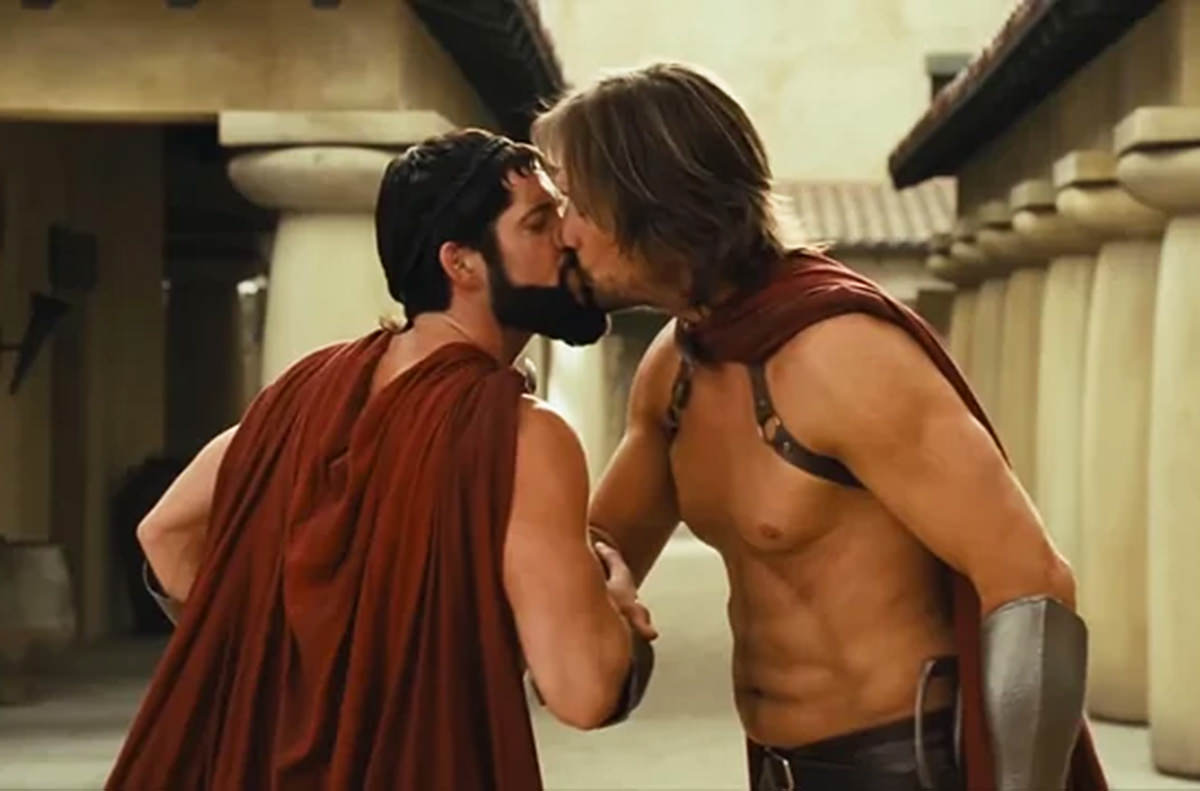

That's it, Sorbo, put your back into it! Such a hypocrite. Lord what a piece of shit.
And now I'm going back to work. Feel sad for me since my circadian rhythm is fucked.
 WARNING: This entry contains technical stuff most people won't care about!
Once I had finally saved enough money to replace my aging QNAP NAS (Network Attached Storage) system with shiny new UGREEN devices, I was dismayed to find that some of the apps I relied on were not available in their app repository. "ZOMG! WHERE'S PLEX?!?!" I screamed. "HOW CAN YOU SELL A NAS THAT DOESN'T HAVE PLEX?!?" Sure QNAP was always late to the table with updates to their apps, but at least they had apps.
Enter Docker...
"Docker is an open platform for developing, shipping, and running applications. Docker enables you to separate your applications from your infrastructure so you can deliver software quickly. Docker provides the ability to package and run an application in a loosely isolated environment called a container. The isolation and security let you run many containers simultaneously on a given host. Containers are lightweight and contain everything needed to run the application, so you don't need to rely on what's installed on the host."
Or, to put it another way, Docker lets you run the apps that aren't in your NAS's app repository.
Now, before I dig into it, there is something I've learned about Docker. Primary of which is that a lot of people are moving away from it because it's gotten bloated and resource hungry. There are even lighter alternatives being developed which do the same thing more efficiently. But none of them are in the UGREEN app repository like Docker is, and I don't want to take the time to learn how to manually install them. So here I am running Docker.
Not that Docker is easy, mind you.
Things can get very tricky when trying to install apps, even when you are following a step-by-step guide you found on the internet. You're still going to have to deal with SSH and config files (called "compose.yml") and other stuff that ain't a point-and-click process. You will have to get your hands dirty and that can be frustrating. I can say that the more you use Docker, the easier it gets.
The important thing to note is that despite some difficulties, I do have my apps up-and-running on my NAS now. I'm going to drop those apps here in case I ever need to refer back...
Since discovering the joys of Docker, I'm sure there are several other apps out there that I will be installing. And there's a lot of apps out there.
So... my initial panic of UGREEN not having many apps has been resolved. About the only UGREEN apps I use now are Docker and Sync & Backup (I have a secondary cheaper UGREEN NAS in a separate location which regularly pulls all my data off my home NAS via TailScale so I have an off-site backup). Everything else is on Docker. Which has changed the way that I use my devices and store my data.
In a good way.
 Back when I used to travel constantly, I took my laptop and had all my work files on Dropbox so they were accessible no matter where I was at.
But my personal files back at home were problematic. I'd go to look at some of my photos while on the road and the Plex server would glitch. I'd be on vacation somewhere and find that I couldn't reach my files back home. It was a serious problem, because sometimes the files or documents I needed were urgent. I once had to have a friend run to my house, print out a document, take a photo of it, and send it to me while I was rushing around an airport. Not fun at all.
So when I traded in my old NAS (Network Attached Storage) drive for a new one, a priority was figuring out how to have a clean tunnel back to my house for whatever I needed to do.
I was about ready to give up when I saw TailScale mentioned in a NAS forum. For personal use it's free, so I really had nothing to lose.
It took some doing to get everything working on my NAS (it's not a click-and-install deliverable, so you have to learn how to run it as a Docker container), but once you get things running? You have your own personal network between all your devices! Just install the client app on your computers and phones and whatever via a VPN, then point your apps to the private address assigned to them, and you're done!
Now I can watch my videos streaming from my Plex server with zero issues (this is something that has always been problematic via Plex itself). I can use my iPhone to look at all my photos being indexed and served from Immich with ease. My personal document library is available anywhere I have internet. And Tailscale is blazingly fast about it, which is so nice.
If you're wanting to have a private network where all your devices can talk to each other securely, then Tailscale might be for you. All the information you need is on their website. And if you're looking for a VPN solution for your work, then Tailscale seems reasonably priced.
More tech drama. Have I mentioned how much I loathe Apple HomeKit HomeShit?
If I haven't (let's be real, I definitely have) then you should probably know that my hatred is very real, and has now reached such depths as to send me into a rage just thinking about it. As I wrote yesterday I awoke to find that on the first day in this Year of Our Lord, 2026, 3/4 of my "smart" home devices were offline and half my Automations were missing. Now, when this happens I can usually get most of those devices to come back online if I power-cycle all my hubs (nothing can be done to bring back the automations). It's for this reason that I have non-HomeShit power plugs on all my iPod minis and AppleTVs.
And so, before I left on an errand I had to run before work, I sat in my car to power off all the hubs. Then, when I finished my errand and made it to the office, I turned them all back on. Three hours later as I ate lunch, I pulled up Apple's HomeShit app on my iPhone... and... there were stil six devices which hadn't recovered. Which means I'm going to waste time removing them then resetting them so I can re-add them before re-writing the Automations that got trashed somehow.
Easy.
Just time-consuming.
And here's a new wrinkle... the re-written automations do not work!
No idea why. I can test them. They test as expected. But they don't work.
For exmaple... I have it so when one of the lights in the guest bathroom is turned on, the other light turns on too. Turn one off, they both turn off. It's incredibly basic, but important because otherwise it's not light enough in there.
Absolutely no idea what I do now. After dinner I'll delete them all and try re-writing one more time. If that doesn't work, I guess I have to try removing devices and re-adding them. If that doesn't work, then I guess I have to completely reset absolutely everything and start over from scratch.
If that ends up being the case, I can say goodbye to my weekend.
Which brings me to a decision I have to make...
I gotta tell you... Option #3 is looking very appealing to me. If I waste two days and the shit is still broken, I'm going to be angry and never get over it. If I trash HomeShit and start over with something else which ends up broken, I'm going to be angry and never get over it. If I just end up giving up completely on having a "smart" home, I'm totally going to be angry.
But I'll get over it.
I just have to go back to remembering where all the light switches are and figure out and possible have to re-think some lighting in a few places. Like the guest bathroom.
In other tech drama, I'm slowly getting all my data transfered from my QNAP NAS to my UGREEN NAS.
This is taking a while because I have a metric shit-ton of photos to copy. I always took a lot of photos when I traveled. Then when the charity closed and I wasn't traveling as much, I ended up with Jake and Jenny and started taking a metric shit-ton of cat photos. You know how it goes.
My problem is (and always has been) that I don't sort through photos after I take them. I snap! snap! snap! snap! take them with the intent of keeping the best images and tossing the rest. Except I never have time to do that. Maybe I'll commit to sorting through 50 photos every morning when I wake up and see if I can whittle down the number of photos in my archive by half. Or, if I get serious about it, whittle down to a quarter of what I'm sitting on. Which should be easy because there's just so many pictures that are practically identical. There's AI software which is supposed to make the task easier, but I've not looked into it. And maybe I should.
In the meanwhile, I guess I save my money for a new pair of hard drives, given the ones I have are all older and probably not very reliable. They will likely be giving up the ghost soon.
Like myself.
Or like my patience with HomeShit, which has now evaporated.
 I believe in supporting the artists whose media I consume, so I buy the media I want to own.
For the longest time this meant VHS Tape, then LaserDisc, then DVD, then Blu-Ray, then Digital. I liked digital because I didn't have to make space for physical media in my home, and it seemed the ideal solution for being able to access the stuff I buy from wherever I'm at. Except it didn't end up working that way. Unlike when you buy a movie on DVD, when you purchase via Digital, you aren't purchasing the media. Instead you are purchasing a license to view that media... and it's a license which the studio or licensee can terminate at any time. And when a TV show I bought was removed by the studio, I swore I would never buy digital again and went back to physical media.
Physical media that I ultimately rip into a digital format as a personal backup (because physical media can deteriorate and become unusable). But all that digital media has to be stored somewhere, and that's where Network Attached Storage (NAS) comes in. This is a box of hard drives that hooks up to your network and can serve your files to wherever you allow it. Meaning that I can access my purchased media wherever I want.
When I went shopping for a NAS years ago, all I wanted was Synology hardware. But I couldn't afford it, so I went with QNAP which was supposed to be the next best thing. It was not. Multiple problems culminated with a ransomware attack that would have lost all my files if not for the fact that I maintain a backup. Between this horrific bullshit and the fact that QNAP apps are always numerous versions behind in their app store and I was done with QNAP, but still stuck with it because I couldn't afford to replace the thing. Instead I turned off all outside access, which was a bummer because I could no longer access my media away from home.
Fast-forward to May 2025 and Synology made a move towards requiring proprietary drives, something to which I said "Oh fuck no!" and scratched them off my list of NAS manufacturers I wanted to deal with. After the fiasco with WD, I buy Seagate IronWolf Pro drives. Period.
Fast-forward again to Black Friday 2025, and I ended up buying a replacement NAS from UGREEN because my QNAP NAS has gotten old with its Celeron J1900 processor, and the 8.5× to 10.5× speed jump of the Pentium Gold 8505 processor in the 4-Bay UGREEN 4800+ was too good to pass up. Even if I had to put it on a credit card to pay the $550.00 price tag.
UGREEN, which is a highly reviewed relatively new player in the NAS market, wasn't originally on my list of options. I don't have anything against a device made in China (because isn't everything?), but knowing that their government might have built a back-door into the system which may compromise my cat photos, and that was a deal-breaker.
But then I found out you can replace the OS with TrueNAS Open Source, if needed, and was like... alrighty then. Not that it much matters, because I was going to firewall it off completely, remove UGREENlink, and go with VPN-only access.
But Anyway...
I've been slowly transferring all my media to the new NAS and have been quite happy with it. The UGREEN model is freakishly faster compared to the old QNAP model I had. Usually, NAS manufacturers put old, slow CPUs in their boxes because you don't need really fast chips to perform file serving tasks. Except serving files is not all that a NAS does. In my case, the NAS also has to run apps to serve media for my laptop and my television (which I do with an app called Plex)... along with a bunch of other apps which do various tasks with my data. And having a fast CPU for those tasks is important.
One of those apps is TailScale, a secure connectivity app which allows me access to my data without having to go through QNAP or UGREEN. Kinda like a private VPN. Thus eliminating my distrust of major companies... no matter where they're located.
Overall I'm very happy with the UGREEN 4800+ NAS. If I have a gripe it's that they don't have many app packages available. For example Plex can't simply be downloaded, installed, and set-up from within the UGREEN app repository. It don't exist. Instead you have to download an abstraction layer called Docker which has all kinds of apps (including Plex and TailScale) to be run and set up as containers that are interpreted for UGREEN. It's nowhere near as easy to go this route than to have a native app, but it does work if you're willing to put in a little research, time, and effort. It took me a couple days to get Plex working correctly because the various "instruction" videos were contradictory and often glazed past critical information, but it's running just fine now.
The quality of the hardware is also very good. The housing is an aluminum alloy instead of the janky plastic housing on my QNAP, for example. I also like the trays for the hard drives, which are tool-free fr 3.5" drives. There are a variety of ports... including SD card slot, USB-C, and USB-A on the front... and HDMI, 3 USB-A, plus 2.5Gb and 10Gb ethernet ports. As if that wasn't enough, the unit arrives with upgrade tools to install an SSD cache and more memory, two CAT-7 ethernet cables, and a power adapter. Maximum capacity is a whopping 136TB over four drives (I have four 16TB drives in a RAID 6 configuration which gives me 29TB of usable space, because I like redundancy for safety).
If I have an outright complaint to offer, it has nothing to do with UGREEN. Instead it's with Plex. This is by far my favorite media serving platform (I bought a lifetime pass within a month of installing it), but it's not without its faults. For one thing, it wants to build movie "collections" even if you tell it not to by setting it to "disabled." And most all of these collections are fucking useless and stupid, so I end up deleting them all. Which takes a crazy amount of time because there are so many. But even worse is the fact that I have found no easy way of transferring all my title adjustments and poster art from my old install for all the titles I have. Which means I'm going to have to start all over again from scratch. That's hours and hours of work. Why there isn't just a folder I can copy over I have no idea. There's a "config" folder, but what I'm looking for isn't there. I guess. Because if there is, I'm not finding it. You'd think that this would be a no-brainer.
I just wish I had the free time to get my latest media purchases ripped so I could add them to my new NAS. I've been wanting to re-watch Superman, and this would be a great excuse to do that.
 Every year or so people are sharing what apps they have on their phone's home screen, and I'm not immune to the immense pressure to join in.
Either that, or I am totally lacking content for today's post.
Anyway... here's my home screen...
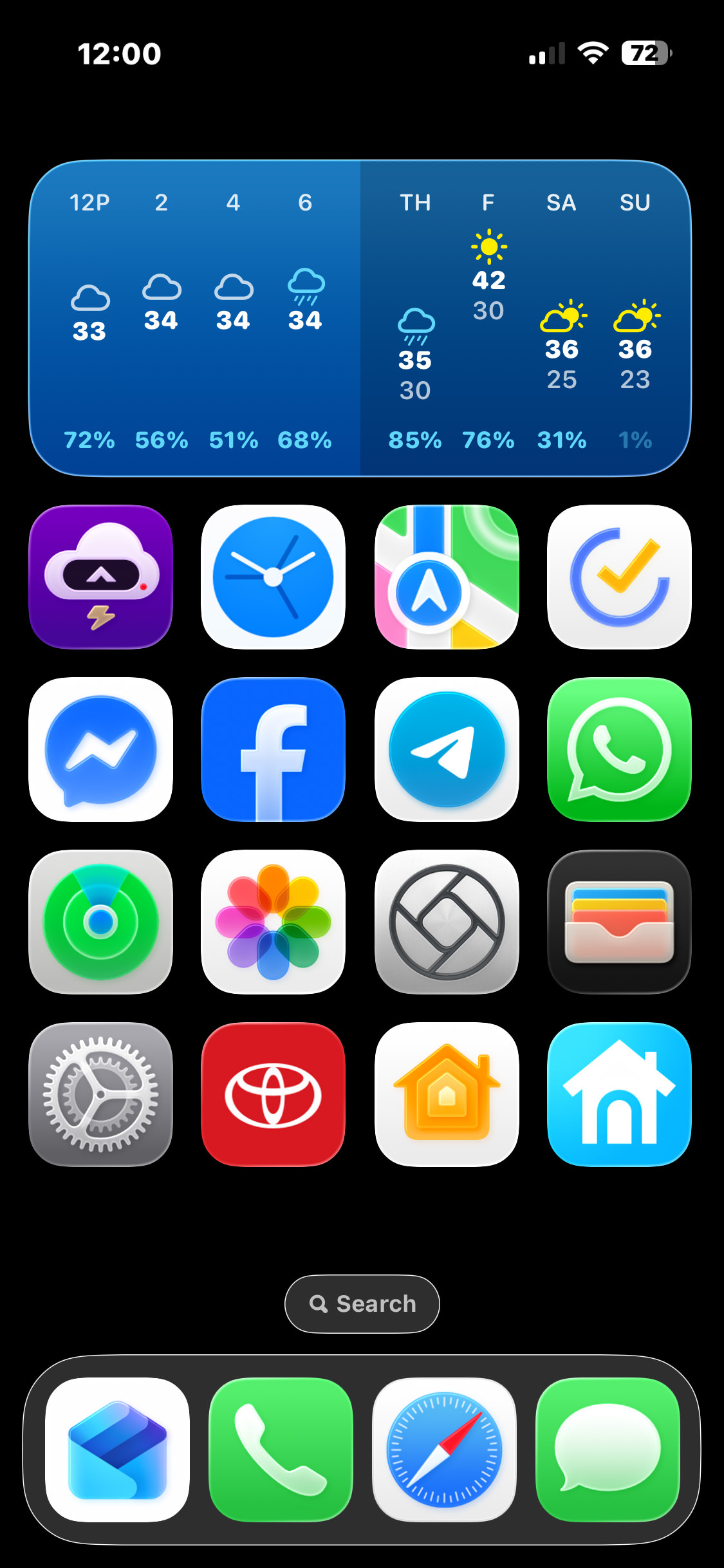
Yes. I know. I am aware.
My screen is boring as hell. But that's intentional. I want as distraction-free an experience as possible. Which means my background is black so the icons have focus. I know what the icons are, so I remove the text by having them at maximum size. The only widget I have is Carrot Weather (both hourly and forecast). And there's the apps...
Oh... by the way, Happy Thanksgiving, everybody!
For future reference, these recipes turned out pretty great and are suitable for Thanksgiving or any time...
 It's the busy time of year for me! I start work at 4:30am, head into the office at 8:30am, then head back home at 3:30pm, grab something to eat, then work until I fall asleep.
The problem is that I am so exhausted when I go home to eat that every little thing feels like too much effort. Just look at the number of times I dreaded having to do something menial...
But anyway...
Eddy is back, and this time he's entering psychosis with CHATGPT...
How does this not scare the ever-loving shit out of people? He did this for fun, but you just know there are thousands upon thousands of people going through this for real.
I have turned off every AI option I can find on all my devices and have done what I can to eliminate AI with the services I use (including Google, where you can search with "-ai"). I do this not just because it's rarely helpful and a waste of time, but also because I don't want to contribute to AI farms stealing resources and destroying lives.
Maybe AI can destroy my life so I can stay in bed tomorrow.


 Atom Entries Feed Comments Feed