

 Merry Christmas to those who celebrate it!
Welcome to an extension of Home Automation Week at Blogography! I say "extension" because a week has seven days and this is part eight. I guess I should have put a bit more thought into this.
But anyway...
I loathe smoke detectors. I loathe CO2 detectors even more. They're all bug-ridden, noisy, and prone to errors. Then you've got the damn batteries running out all the time which results in running around the house trying to figure out which alarm is "chirping" at you for attention. And God help you if you burn the toast.
Don't get me wrong though... if there's an actual fire in the house... or a CO2 leak... then I frickin' love detectors. But, for the most part? Not so much.
When I was looking into "smart" detectors last year, I was intrigued by Nest Protect. It seemed sensible, secure, feature-rich, and very cool. Ultimately I took a pass on it for two good reasons: 1) Nest Protect wasn't compatible with Apple's HomeKit, and 2) A lot of people were complaining about false alarms and features being turned off and never turned back on, despite promises from Nest.
But then two things happened: 1) Apple's HomeKit turned out to be a STEAMING PILE OF SHIT*, and 2) Nest came out with a "Protect Version 2" that supposedly addressed the many problems people were having. Oh, and the reviews were great...
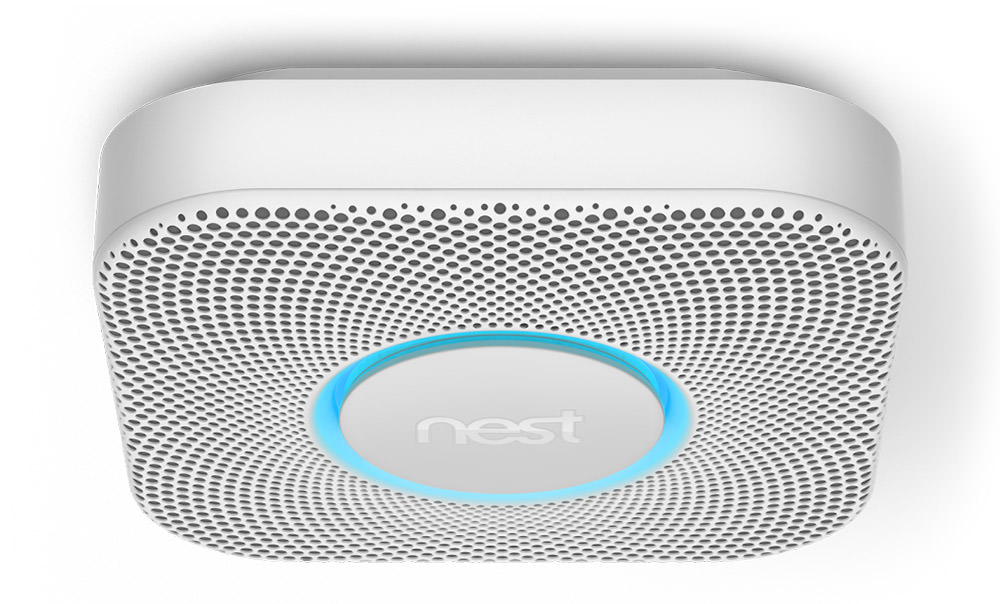
This is probably Nest Protect v1. I think v2 is not so squared? Very close though.
And so... I went ahead and bought Nest Protect. Actually, I bought five of them, because that's how many
Setting up Nest Protect couldn't be easier.
Except when it is.
When you first open the thing, they tell you to set it up before you hang it. That way you're not climbing up and down a ladder if there's a problem, I guess. So I pulled the strip to engage the battery and my first Nest Protect told me to "PRESS THE BUTTON IF YOU WANT THE LANGUAGE SET TO ENGLISH!" And so I pressed the button. But apparently not fast enough, because my Nest Protect started speaking to me in Spanish. And wouldn't stop. Fortunately I was able to get the gist of what she(!) was saying and set things up without issue. Removed my old old smoke detector, no problem. Installed the mounting plate, no problem. Hung my Nest Protect, no problem. Tested the unit, no problem. Change the language to English... problem.
Using the iPhone Nest App, I was able to switch to English easily. But then I get a message saying "Changes will take place within a day." Yes... A FUCKING DAY! And they mean it. When I went to work two hours after installation, it was still hablaba español. Kind of ridiculous it should take so long, but okay.
Nest Protect does exactly what you'd expect a smoke/CO2 detector to do... detect smoke and CO2 and then sound an alarm if it finds anything. But Nest Protect goes much further than that...
Nest Protect is available in both battery-powered and power-line-powered options. My old alarms were power-line-powered, so that's what I bought. If the power goes out, the battery back-up kicks in and the outage is recorded, then (apparently) reported to your phone app. I never got a notification when I tripped the breaker for the the smoke alarms, which Nest says I will. If ALL power goes out, I don't see how Nest Protect can notify you because then the internet would be out as well, wouldn't it?
And so...
All in all, I'm most impressed with Nest Protect. I haven't had it long enough to know if the chronic false alarm problem that plagued v1 has been truly solved with v2, but I'm hopeful. And, of course, I haven't had an emergency to truly put it to the test, but I'm very much okay with that. What I can say is that all the various features seem to be working as advertised. I love being able to check in on my home when I'm gone and know everything is okay... but I've even more in love with the idea that if there's a serious problem with fire or CO2, my home will let me know.
*I will talk more about Apple HomeKit being a STEAMING PILE OF SHIT tomorrow.
Welcome to Home Automation Week at Blogography!
I've been dreaming of having a "smart home" for years, but the technology never really seemed "there" yet. It's either been flakey or lacked important features or had some quirk that made it less than ideal. I just couldn't see investing the money for an experience that was less than stellar.
But then Apple decided to get into the game by announcing their "HomeKit" platform and I was convinced that this was the solution I had been waiting for. Apple has a real knack for perfecting technology in a way that's smart, elegant, and simple, and finally they had turned their almighty gaze towards home automation. At last.
And so I waited.
And waited.
And waited.
But, other than an announcement, Apple never did shit for the longest time. Third party solutions never came.
Apple eventually got around to improving the HomeKit platform to make it more capable... and a few devices were released here and there... but overall HomeKit has been a failure. I love the security that Apple built into their solution (they really take stuff like that seriously), but that's about the only thing they've done right. Everything else to do with HomeKit has ended up being utter shit. The biggest failing being that all HomeKit devices are local, meaning that you have to be at home to control your home. Their solution for remote access is via Apple TV, but I've never been able to get it working well.
And so I went searching for a new solution.
I looked at every option I could find... Lutron, Wink, SmartThings, INSTEON, Nest, Belkin WeMo... the list goes on an on. There are a lot of companies out there doing home automation, and new ones are popping up all the time.
But which platform to choose?
At first I was convinced that I needed a single-company solution. If everything came from the same company, it would all work together and I'd have the most complete, powerful, and capable system. Right?
Well... not so much.
Every company has their strengths and weaknesses, which made choosing a single source for everything quite difficult. So after a while I decided I'd split my home automation chores between two different companies, focusing on their strengths to get the best system possible. Sure they probably wouldn't play well together, but if I were smart about which company got which devices, I could come up with a split-system that worked well for what I was trying to do.
It was a good plan.
But a plan doomed to failure.
Which I'll talk about in my next entry.


 Atom Entries Feed Comments Feed